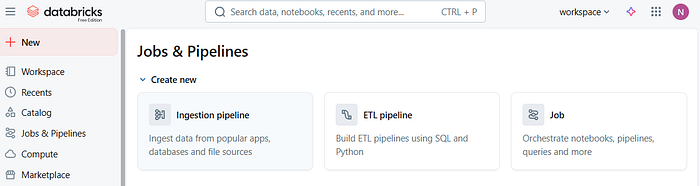
Databricks Lakeflow: The Future of Data Pipelines — Simpler, Faster, and Smarter than ADF(Azure…
A perfect metaphor to describe the difference between ADF and Lakeflow in a way anyone can understand.
a11y-light · October 18, 2025 (Updated: October 18, 2025) · Free: No
If ADF was the conductor of an orchestra, Lakeflow is the musician that composes, plays, and optimizes the music all by itself. 🎵
This is actually one of the most interesting comparisons happening right now in the Azure + Databricks ecosystem.
Let’s break it down clearly: Why Databricks Lakeflow is the Future of Data Pipelines (and How It Stacks Up Against ADF)
If you’ve been building data pipelines in Azure for a while, chances are you’ve used Azure Data Factory (ADF) to orchestrate Databricks notebooks. It’s a solid approach, simple, visual, and well-integrated with the Azure ecosystem.
But with the introduction of Databricks Lakeflow, there’s a noticeable shift in how data engineering teams can build and manage pipelines.
Lakeflow promises to make pipelines declarative, optimised, and tightly integrated with the Databricks platform.
What is Databricks Lakeflow?
- Think of Lakeflow as a native pipeline layer built inside Databricks.Instead of creating a separate ADF pipeline to call Databricks notebooks, you can define your data pipeline directly in Databricks using a declarative approach.
- Declarative Approach: You describe what needs to happen to the data and Databricks figures out how to make it happen efficiently. This is a big contrast to the old way, where you had to define each activity, dependency, and notebook call manually.
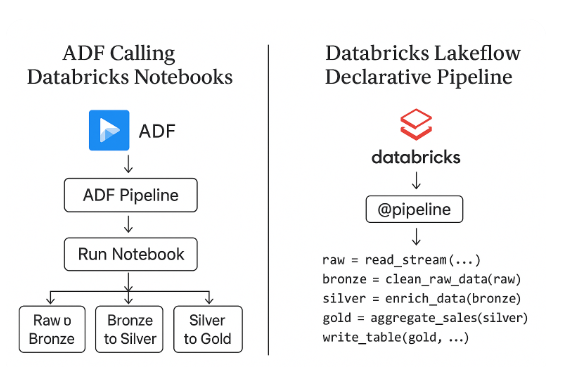
The Old Way: ADF Calling Databricks Notebooks
This pattern has been around for years:
- ADF orchestrates multiple Databricks notebooks.
- Each notebook handles a layer- raw, bronze, silver, gold
- Dependencies are managed via pipeline activities and triggers.
- Works fine for small setups but as the platform grows, we notice
(i) Too many pipelines and notebooks to manage,
(ii) Each activity spins up a new cluster or context.
(iii) Lineage and governance is disconnected.
(iv) Debugging is not easy for complex pipelines.
That’s where Lakeflow comes in:
The New Way: Databricks Lakeflow Declarative Pipelines
With Lakeflow, everything happens within Databricks — ingestion, transformation, orchestration, and monitoring.
Instead of orchestrating notebooks, you simply define your data flow like this:
@pipeline()
def sales_pipeline():
    raw = read_stream("abfss://.../raw")
    bronze = clean_raw_data(raw)
    silver = enrich_data(bronze)
    gold = aggregate_sales(silver)
    write_table(gold, "catalog.sales.gold")
Databricks then:
- Builds the dependency graph,
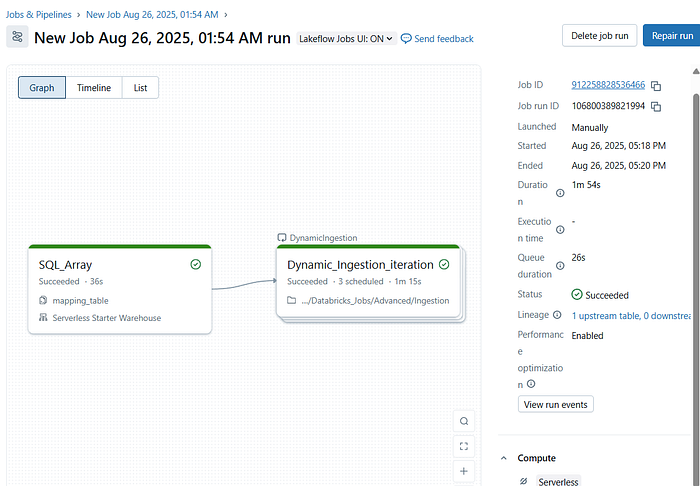
- Schedules execution,
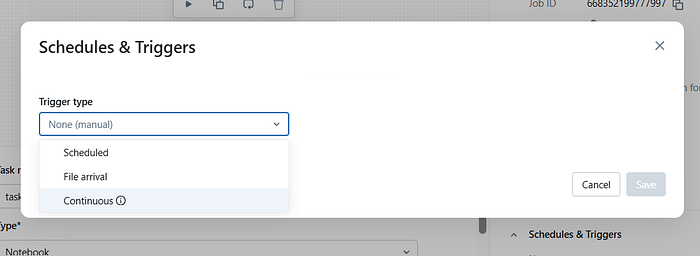
- Optimizes resource usage, and
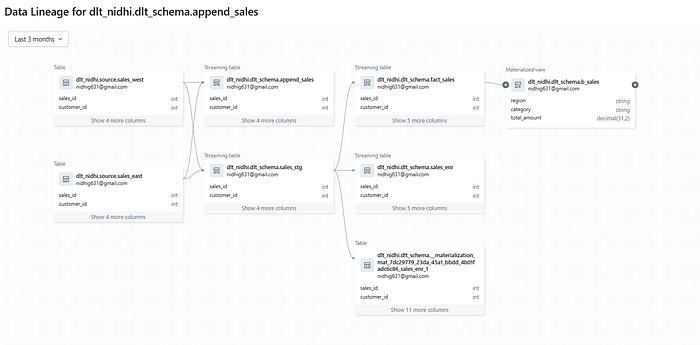
- Tracks lineage in Unity Catalog automatically.
.
No external orchestration needed.
Why Databricks Lakeflow is Good?
Let’s break down the benefits in simple terms:
- Simpler Pipeline Design
- No more juggling between ADF and Databricks.
- We can define all the pipeline logic at one place without extra orchestration logic.
2. Performance Boost
- Everything runs natively inside Databricks, Serverless and Unity Catalog.
- Pipeline can reuse clusters.
- Execution plans are automatically optimised.
- Data movement is minimised.
Easy, Optimised, Faster performance and low latency.
3. Automatic Lineage and Governance
Because it’s built on Unity Catalog:
- Lineage is automatically tracked down to the column level.
- Every table, transformation, and dataset is cataloged.
- You can easily audit or trace data flows end-to-end.
No need for manual setup with Purview or external tools.
4. Cost Efficiency
- ADF orchestration adds extra cost each activity can trigger a new job cluster and add orchestration overhead.
- Lakeflow pipelines run in a single optimized Databricks job, reducing compute waste and orchestration cost.
5. Declarative = Less Maintenance
- In ADF, you write how to do things (activities, retries, triggers). In Lakeflow, you describe what needs to happen — Databricks takes care of the rest.
- This makes pipelines easier to maintain and scale. If something fails, Lakeflow knows exactly where to resume from — no manual restart needed.
6. End-to-End Integration
Lakeflow connects seamlessly with:
- Delta Live Tables
- Unity Catalog
- Delta Sharing
- MLflow
It’s not just an orchestration layer it’s a unified data management experience.
Summary
- If your project already runs fully on Databricks and ADF is just there to schedule notebooks, switching to Lakeflow makes perfect sense — it keeps everything native, faster, and easier to manage.
- If your data stack revolves around Databricks + Delta + Unity Catalog, then Lakeflow is the natural evolution for you.
- It simplifies your architecture, reduces cost, and gives you end-to-end visibility within one platform.
- However, if your organization still heavily relies on multiple Azure services and uses Databricks as just one component, ADF may continue to serve well for orchestration.
Databricks Lakeflow brings a new generation of pipeline building simpler, faster, and more integrated. It’s not just another orchestration tool it’s a data-native orchestration engine built for the lakehouse era.
Thanks for the read🙏🙏.Do clap👏👏 if you find it useful😃.
“Keep learning and keep sharing knowledge”
-
Discord Translator
Translate messages in Discord Add To Chrome -
WhatsApp Translator
Translate messages in WhatsApp Add To Chrome -
Prompt Optimizer
Optimize your prompts for AI models like ChatGPT, Claude, and Gemini. Add To Chrome